I Built This Site Entirely From My Phone
Two days ago I decided I wanted a personal site. Something simple: a bio, some links, a blog for technical writing. I’m a backend engineer with seven years of experience (Palantir, Vannevar Labs, now Pryzm) but I’ve never had a canonical place on the internet. That felt like a gap worth closing.
What started as “I should spin up a quick site” turned into an experiment: could I do the whole thing from my phone? Not as a stunt, but as a genuine test of a workflow I’ve been thinking about. I wanted to know what’s actually possible when you combine a phone, an AI coding tool, and the random idle moments scattered through a normal day.
This is that story. The site you’re reading right now was built, reviewed, and deployed across many micro-sessions over two days, entirely on a Galaxy S26. I never opened a laptop. I still haven’t previewed it on a desktop.
Why my phone
About eight months ago, I fully deleted all social media from my phone. But eliminating scrolling habits has been a longer process. Two to three years of gradually removing every app that existed mainly to fill dead time. No Instagram, no YouTube, no Twitter, no Reddit. My phone is now mostly a communication device and a camera.
The result is that I have these small pockets of time throughout the day (waiting for a coffee, sitting on the couch, on the bus, lying in bed) where I used to pull out my phone and scroll. Now I just… don’t. Sometimes that empty space is good. Sometimes it’s boring.
I’ve been wondering: what if I could use those moments to work on a personal project? Not in a “hustle culture, always be productive” way, but as a replacement for the scrolling reflex. If I’m going to look at my phone anyway, building something is more interesting than doomscrolling was. And if an AI coding tool can do the heavy lifting in a terminal, maybe a phone is actually a viable development environment.
So when I had the idea for this site yesterday morning, I decided to find out.
The setup
My tools were simple:
- Claude Code running as a remote session in the Claude mobile app — a full terminal environment where Claude can read, write, and run code
- GitHub mobile app for reviewing pull request diffs
- Mobile browser for Cloudflare dashboard (more on this later)
- Keep Notes for drafting long messages (a workaround I’ll explain)
My background context: I’ve been writing backend services and infrastructure code for seven years. I’m comfortable with Git, CI/CD, and deployment pipelines. But I have almost no frontend experience. I’ve never set up a static site generator. I didn’t know what a JSX component was, or how CSS media queries work, or what an RSS feed actually looks like under the hood. This was simultaneously a build-and-ship project and a crash course in frontend development.
The process
Choosing the stack
I started by telling Claude what I wanted (a minimal text-first site, no JavaScript, no CMS, good typography, easy to add posts) and asked for options with tradeoffs before committing to anything. Claude proposed three paths: Hugo (Go-based, single binary, zero Node dependencies), Zola (Rust-based, similar philosophy), and a custom Python build script.
What followed was a long back-and-forth where I asked about everything I didn’t understand. What’s an RSS feed, and how does it actually work from producer to consumer? What are Open Graph tags? What’s the difference between React, Vue, Svelte, and Astro? What’s a static site generator actually doing at build time? What does “zero runtime JavaScript” mean?
Claude explained each concept, I asked follow-ups, and gradually I built enough understanding to make an informed choice. I picked Astro, a static site generator that outputs plain HTML by default but supports React components if I ever want interactivity later. The deciding factor was that Astro lets me treat the generator as a swappable implementation behind a stable interface (my markdown files). Backend engineer brain: I wanted a clean separation between my content and my rendering engine.
I also made deliberate choices about package management security (pnpm with lifecycle scripts blocked by default, committed lockfile, pinned Node version) and codified all of these decisions in a CLAUDE.md file and a README.md so they’d survive future sessions.
Building
Claude scaffolded the entire project: Astro config, layouts with Open Graph tags, a home page with my bio, a blog index, individual post pages, an RSS feed, a sitemap, and one hand-written CSS file. Every design decision was in the conversation. I chose the constraint of a single CSS file, serif typography, constrained line width, no frameworks. Claude wrote the code; I reviewed every file.
The review happened in the GitHub mobile app. Claude committed to a feature branch and pushed. I opened the PR on my phone and read through every diff: the Astro templates, the CSS, the content schema, the build config. When I had questions (“why Charter for the body font?” “what does this Zod schema actually do?” “why is the posts query duplicated across files instead of extracted?”), I asked them in the Claude Code chat and got answers in context.
This part actually worked better than I expected. Reading code on a phone isn’t as painful as it sounds when the files are small and focused. And these files were small by design. The whole site is maybe 800 lines of actual code.
The learning
What surprised me was how much I learned. Because I was reviewing everything Claude wrote and asking “why?” at every step, I ended up with a fairly deep understanding of concepts I’d never worked with:
- How static site generators work — the build pipeline from markdown files through templates to plain HTML
- RSS feeds end-to-end — just a static XML file that readers poll on a schedule, radically simple
- Open Graph and meta tags — the invisible metadata that controls how links preview on social media
- Component composition — how the concept evolved from PHP includes to Django template inheritance to React components to Astro’s
.astrofiles - File-based routing — the filesystem-as-router pattern and how it compares to explicit routing (like React Router or Django’s
urlpatterns) - npm supply chain security — postinstall scripts as attack vectors, pnpm’s default-deny model, why you review lockfile diffs
- The frontend framework landscape — what React, Vue, Svelte, and Astro each do and how they differ in philosophy and execution model
- Content portability — designing markdown content as a stable interface so the generator is swappable
From my phone’s app usage data, I spent about seven hours in Claude over two days. A lot of that was the learning: asking questions, reading explanations, then cross-referencing the actual code in the GitHub mobile app. The build itself would have been faster without the deep dive, but the deep dive was the point. I wanted to understand what I was shipping, not just ship it.
Obstacles
The lost input problem
The Claude mobile app has a text input box at the bottom. Multiple times, I’d spend five or ten minutes composing a detailed message (a batch of questions about the code, or feedback on the PR) and then accidentally hit the back button to exit the conversation. When I reopened it, the input was cleared. Gone.
After this happened several times, I started drafting long messages in Keep Notes first, then pasting them into Claude as a single block. It’s a workaround, not a fix. The app should either save draft input or at least warn before clearing it.
The scroll position reset
When Claude gave long, detailed responses (which happened often since I was asking conceptual questions), I’d read partway through, switch to GitHub to look at the relevant code, then switch back. Every time I returned to the Claude app, my scroll position had reset to the bottom. I’d have to scroll back up through a long response to find where I left off. This happened constantly. If I was doing a lot of cross-referencing between Claude and GitHub, the scroll would reset every other minute. Over two days of this, it was easily the most persistent source of friction in the whole workflow.
The Cloudflare OAuth saga
This was the hardest part of the entire project, and it had nothing to do with code.
After the site was built and the PR was reviewed, I needed to connect my GitHub repo to Cloudflare Pages so that pushes to main would auto-deploy. This requires an OAuth flow: Cloudflare’s dashboard redirects you to GitHub, you authorize, GitHub redirects you back to Cloudflare with a token. Simple in a desktop browser. Broken on mobile.
Attempt 1: Chrome mobile with desktop mode. I toggled “Desktop site” in Chrome and tried the Connect GitHub flow in the Cloudflare Pages dashboard. The redirect would go to GitHub, I’d authorize, and then… nothing. The redirect back to Cloudflare silently failed. I tried this about six times.
Attempt 2: Wrangler CLI from the Claude Code terminal. I worked with Claude to try Cloudflare’s command-line tool, wrangler. But wrangler login tries to redirect to localhost:8976, which doesn’t work when your terminal is a remote session on a different server. And even with an API token, the Claude Code environment’s network proxy only allows outbound connections to a specific allowlist of hosts. api.cloudflare.com wasn’t on the list. Dead end.
Attempt 3: New Claude Code session hitting the Cloudflare API directly. I opened a second Claude Code session with less restrictive network access, created a Cloudflare API token, and worked with Claude to hit the Cloudflare REST API. It successfully created a Pages project and deployed the built site via direct upload. But when we tried to connect the GitHub repo via the API, it returned error 8000011: “internal issue with your Cloudflare Pages Git installation.” The root cause? Even though the Cloudflare GitHub App was installed on my GitHub account, Cloudflare’s own OAuth handshake (the browser flow) had never completed. The API couldn’t reference a GitHub connection that didn’t exist on Cloudflare’s side.
So after all of that, I was back to square one. The site was deployed, but auto-deploy from GitHub wasn’t connected. And the only way to connect it was the same browser OAuth flow that had been failing on my phone.
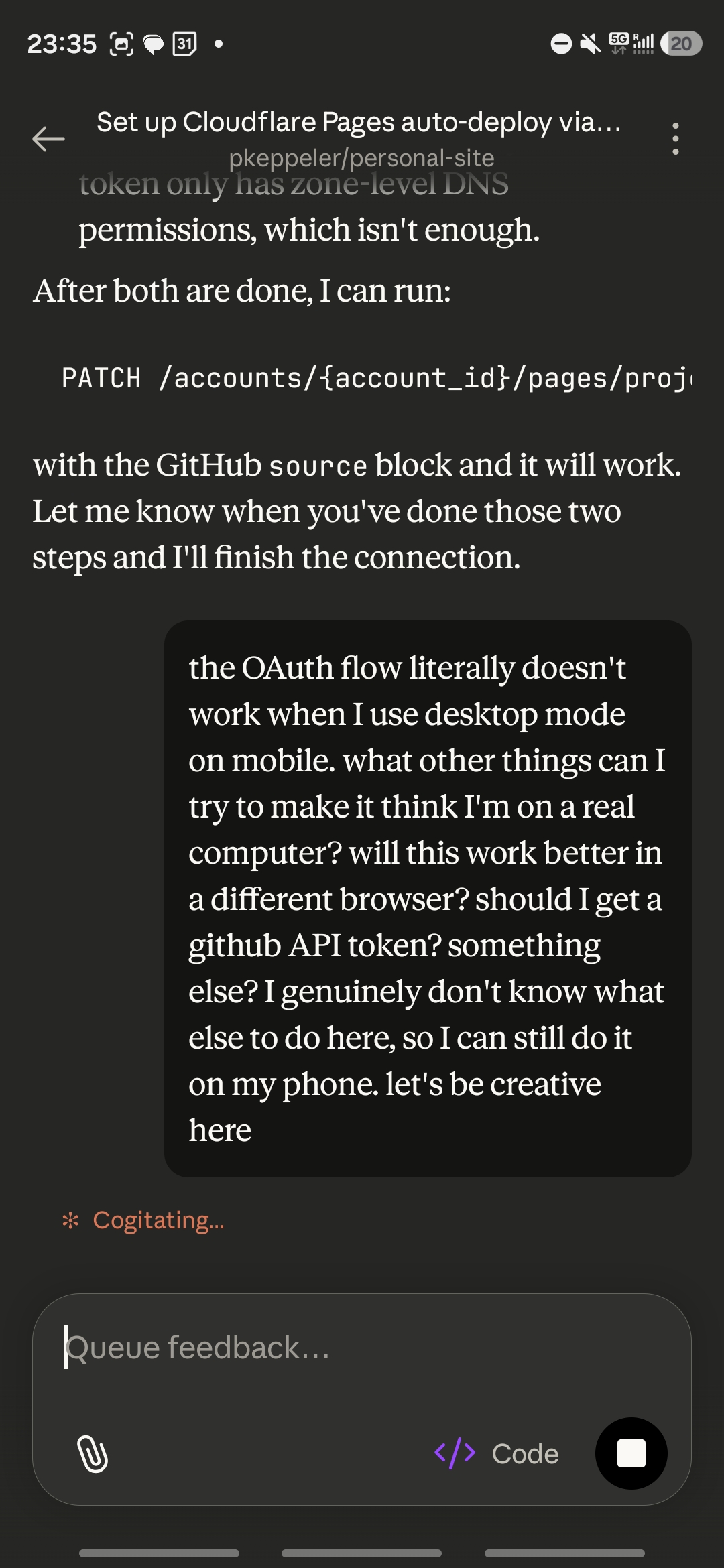
Attempt 4: Firefox, with a lot of persistence. I installed Firefox on my phone. First I tried the Pages-specific GitHub connection URL in the Cloudflare dashboard. Failed. Multiple times. Then I went to the Workers & Pages section, clicked “Create Application,” forced desktop mode on the GitHub authorization side as well, and tried the full flow from there. After a few more attempts, the redirect finally completed. GitHub was connected to Cloudflare.
But there was one more twist: the project I’d created via the API was a “direct upload” project, and Cloudflare’s API returns error 8000069 if you try to add a GitHub source to a direct-upload project (“You cannot update the source object in a Direct Uploads project”). Claude in the second session had to delete the project, recreate it with the GitHub source block, and re-add the custom domains. Then it finally worked.
Total time on the Cloudflare connection: probably two hours across sessions. Total time building the actual site: maybe one hour. The infrastructure plumbing took longer than the software.
The stack
For anyone curious about the technical choices:
- Astro 6 — static site generator, zero client-side JavaScript
- pnpm — package manager with strict security defaults, managed via Corepack
- Shiki — build-time syntax highlighting, no runtime JavaScript
- Cloudflare Pages — hosting with auto-deploy on push to
main - One hand-written CSS file — Charter serif for body text, system monospace for code, no frameworks
The build output contains no <script> tags on any page. The HTML that arrives in your browser is the HTML that was built at deploy time. Nothing executes.
Reflections
The experiment worked. I built and shipped a real project from my phone, across micro-sessions on the couch and the bus and in bed, in about seven hours spread over two days. The code is clean enough that I’m comfortable shipping it. I understand every line because I asked about every line.
Some things worked better than expected:
- Code review on mobile is fine when files are small and focused. The GitHub mobile app’s diff view is genuinely good.
- The conversational format is great for learning. Asking Claude “what is this and why?” in the middle of a code review is the best way I’ve found to learn a new domain quickly. It’s like pair programming with someone who has infinite patience for basic questions.
- Micro-sessions are viable for real work — not just responding to messages, but actual building. The key is that Claude maintains context across the session, so you can put your phone down, come back twenty minutes later, and pick up where you left off.
Some things need to improve:
- Mobile browser OAuth flows are genuinely broken for some services. This isn’t a Claude problem — it’s a Cloudflare (and likely other providers’) problem. If you’re building developer tools, test your OAuth flows on mobile.
- The Claude mobile app needs to preserve draft input and scroll position. These are small things that matter enormously when you’re working in micro-sessions across a day. Losing a five-minute draft because you accidentally swiped back is the kind of friction that makes people give up.
- I need a better workflow for images in posts. Right now, adding an image to a blog post means saving it from my phone, then uploading it to the repo through the GitHub mobile browser. It works, but it’s clunky compared to the rest of the workflow where everything flows through Claude Code and Git. There’s probably a better way to do this that I haven’t figured out yet.
Philosophically, I’m still not sure whether filling idle moments with project work is actually better than just having empty thinking space. Both are better than a scrolling addiction. But there’s something satisfying about looking at a finished, deployed project and knowing it was built in the margins. In the moments that used to disappear into an infinite feed.
I’ll keep experimenting with this workflow. Next up: writing actual technical posts. Those should be easier. It’s just markdown in a file, pushed from my phone.